Storyline 360 blurry on a high-DPI screen or at 150%: the fix
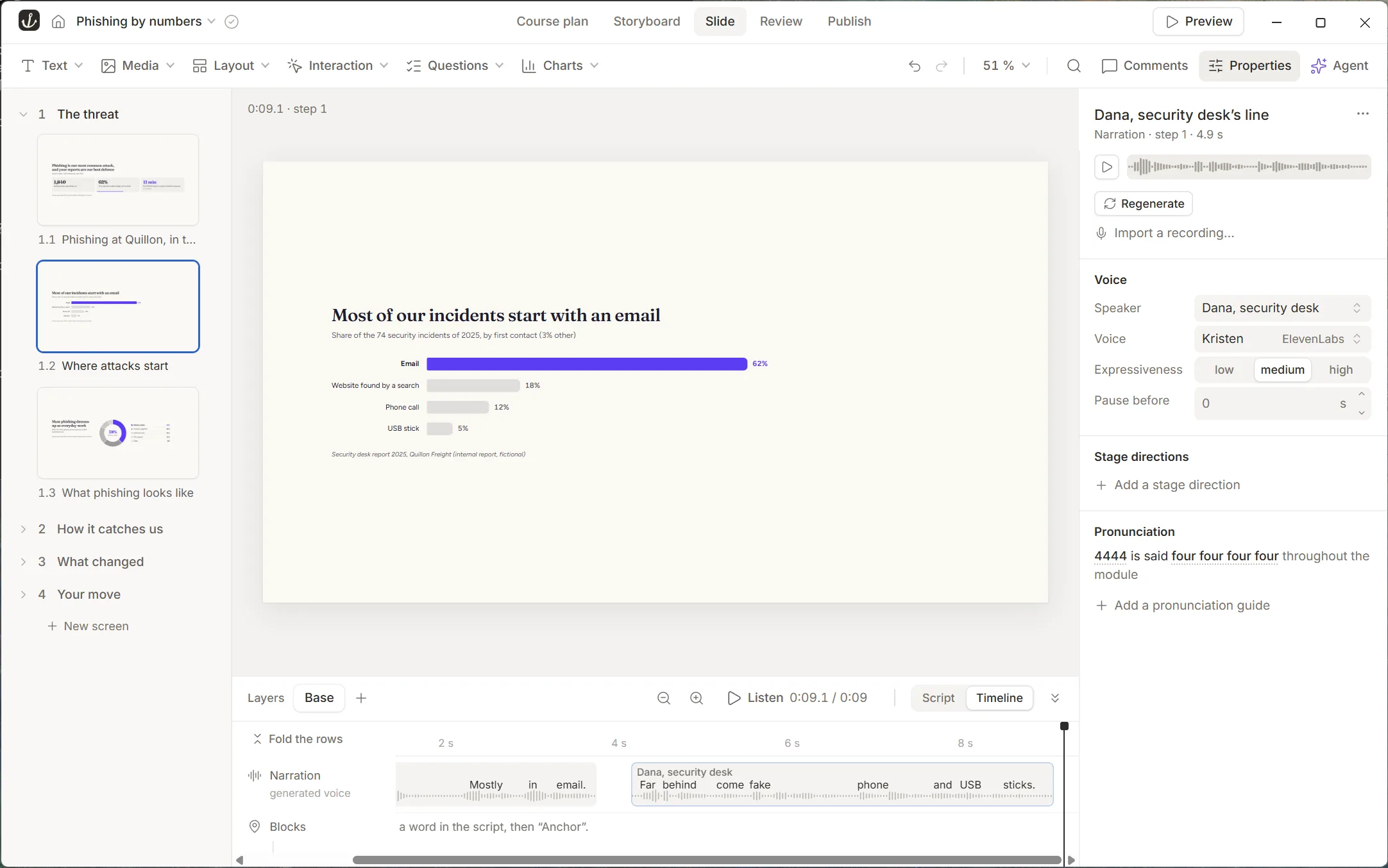
Since 2017, authors report a blurry, pixelated Storyline 360 interface on high-DPI screens, at 125 or 150% scaling in Windows, and in Parallels on a Mac. Articulate logged a feature request in 2023, and no fix is listed up to build 3.129 (28 October 2026). What works today is a Windows compatibility setting: the interface turns sharp, but smaller. Elabora’s interface follows the density of the screen: here it is under Windows at 150%.
The problem
Authors describe it the same way since 2017: Storyline 360 is “blurry, like it’s out of focus” on a 4K screen (Storyline 360 app is blurry in Windows 10 on 4K monitor, 19 replies). It happens when Windows scales the display above 100%, at 125, 150 or 200%, and in Parallels on a Mac’s Retina screen. In 2017, an author already noticed that Storyline 2 stayed sharp at 150% while Storyline 360 did not (Storyline 360 on a high DPI monitor). The thread Storyline 360 UI Still Pixelated on High-DPI Display – Any Updates? (May 2025) still had replies in November 2025, from a 5K screen under Parallels, and in March 2026, at 125% on a 3440 × 1440 screen.
What Articulate says
- In August 2023, Articulate’s staff answered that a feature request was logged to improve support for high-resolution displays, and suggested the compatibility setting below (Pixelated User Interface in Storyline 360).
- From build 3.98 (April 2025) to build 3.129 (28 October 2026), no entry of Storyline 360’s version history mentions the editor’s blur or its scaling.
- The Articulate 360 roadmap (updated 5 November 2026) mentions high-DPI displays once, for the screen recorder, not for the editor.
The fix in Storyline today
- Close Storyline 360.
- Right-click its shortcut or its program file, and choose Properties.
- In the Compatibility tab, click Change high DPI settings.
- Tick Override high DPI scaling behavior, and set Scaling performed by to Application.
- Open Storyline again: the interface is sharp.
The cost: Storyline then draws at 100%, so its text and buttons look smaller on a screen scaled to 150% or more, and some authors report other display issues with this setting. Setting Windows itself to 100% gives the same sharpness, with everything small. On a Mac, in Parallels, authors report the same blur (Mac M1 With Parallels: Articulate Storyline is Blurry, 2022): the setting above applies inside the Windows virtual machine.
What Elabora does differently
Elabora’s interface is made of HTML and CSS, drawn by Chromium, the engine of Chrome, with no setting that forces a scale: it follows the density of each screen. On a Mac, Elabora is a Mac app, with no virtual machine.
Below, Elabora’s editor under Windows at 150%, at its real size: the toolbar and the Properties panel, cut out of a full capture of the editor on the example course Phishing by numbers.
Elabora’s limits today
We list them on every comparison. They are what we work on first.
- Importing Storyline and Rise courses is in beta. Some question types, triggers and interactions come over as text with a note, and the import report lists each one.
- A young tool: the first public version came out on 20 October 2026, and Elabora is in beta. Expect fewer tutorials and community answers, and a new version every few days.
- One author per course for now. Co-authoring and shared team spaces come later, with Elabora’s cloud.
- A smaller library: 7 templates and starter blocks, and no stock library of photos or characters. Your AI makes illustrations, backdrops and layouts to measure for each course.
Questions
- Why does Storyline 360 look blurry at 150%?
- When an app draws itself at 100%, Windows enlarges its picture to the screen’s scale, and the enlarged picture is blurry. The compatibility setting below lets Storyline draw at 100% on its own: sharp, but smaller.
- Is Articulate fixing it?
- A feature request for better high-resolution support has been logged since 2023, according to Articulate’s staff. As of 6 November 2026, no Storyline 360 build lists a fix, and the roadmap’s one high-DPI item concerns the screen recorder.
Try Elabora on your computer. It’s free.
Download Elabora